TutorProMax Developer Guide
Acknowledgements
TutorProxMax is adapted from AddressBook Level 3: https://github.com/nus-cs2103-AY2425S2/tp
Setting up, getting started
Refer to the guide Setting up and getting started.
Design
Architecture
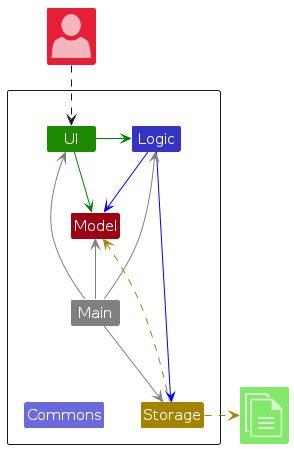
The Architecture Diagram given above explains the high-level design of the App.
Given below is a quick overview of main components and how they interact with each other.
Main components of the architecture
Main (consisting of classes Main and MainApp) is in charge of the app launch and shut down.
- At app launch, it initializes the other components in the correct sequence, and connects them up with each other.
- At shut down, it shuts down the other components and invokes cleanup methods where necessary.
The bulk of the app's work is done by the following four components:
UI: The UI of the App.Logic: The command executor.Model: Holds the data of the App in memory.Storage: Reads data from, and writes data to, the hard disk.
Commons represents a collection of classes used by multiple other components.
How the architecture components interact with each other
The Sequence Diagram below shows how the components interact with each other for the scenario where the user issues the command delete 1.
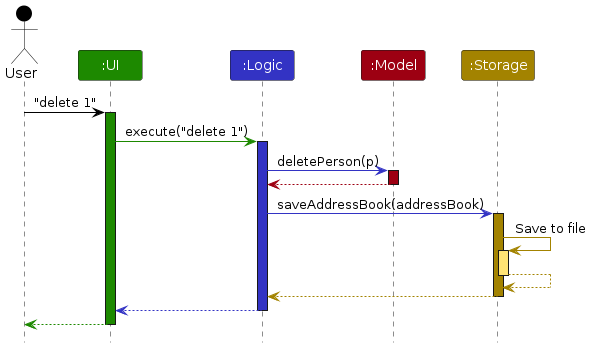
Each of the four main components (also shown in the diagram above),
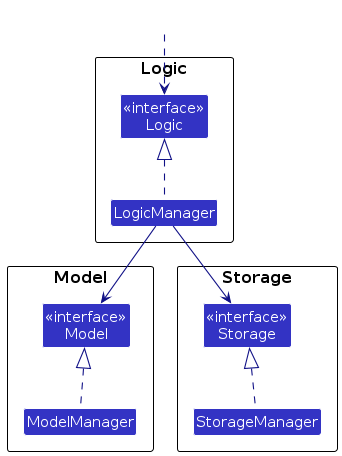
- defines its API in an
interfacewith the same name as the Component. - implements its functionality using a concrete
{Component Name}Managerclass (which follows the corresponding APIinterfacementioned in the previous point.
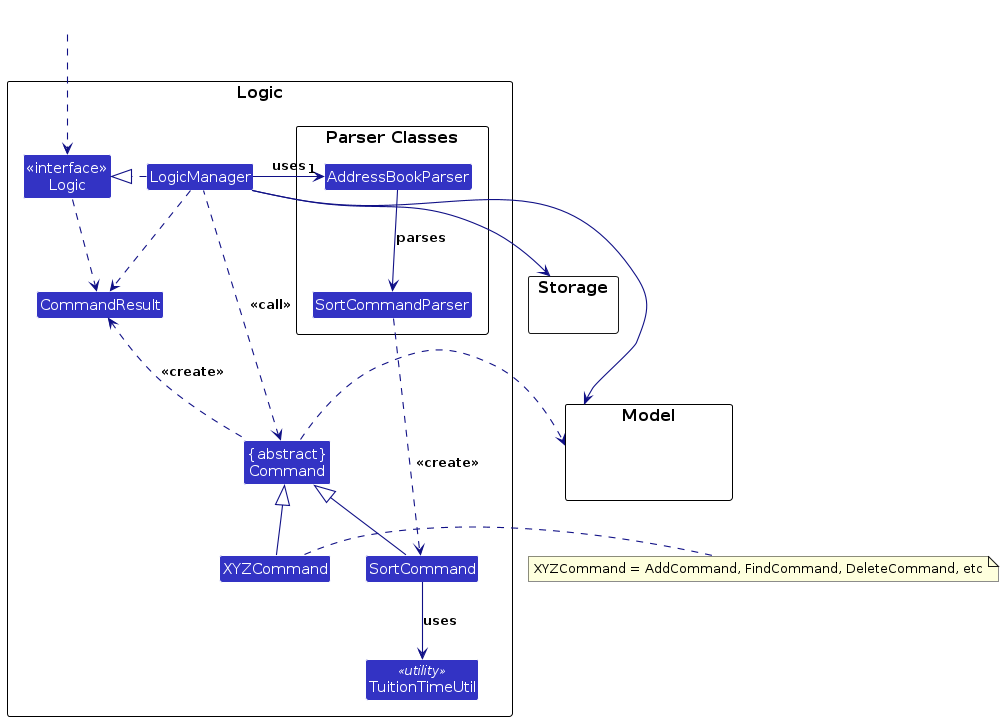
For example, the Logic component defines its API in the Logic.java interface and implements its functionality using the LogicManager.java class which follows the Logic interface. Other components interact with a given component through its interface rather than the concrete class (reason: to prevent outside component's being coupled to the implementation of a component), as illustrated in the (partial) class diagram below.
The sections below give more details of each component.
UI component
The API of this component is specified in Ui.java
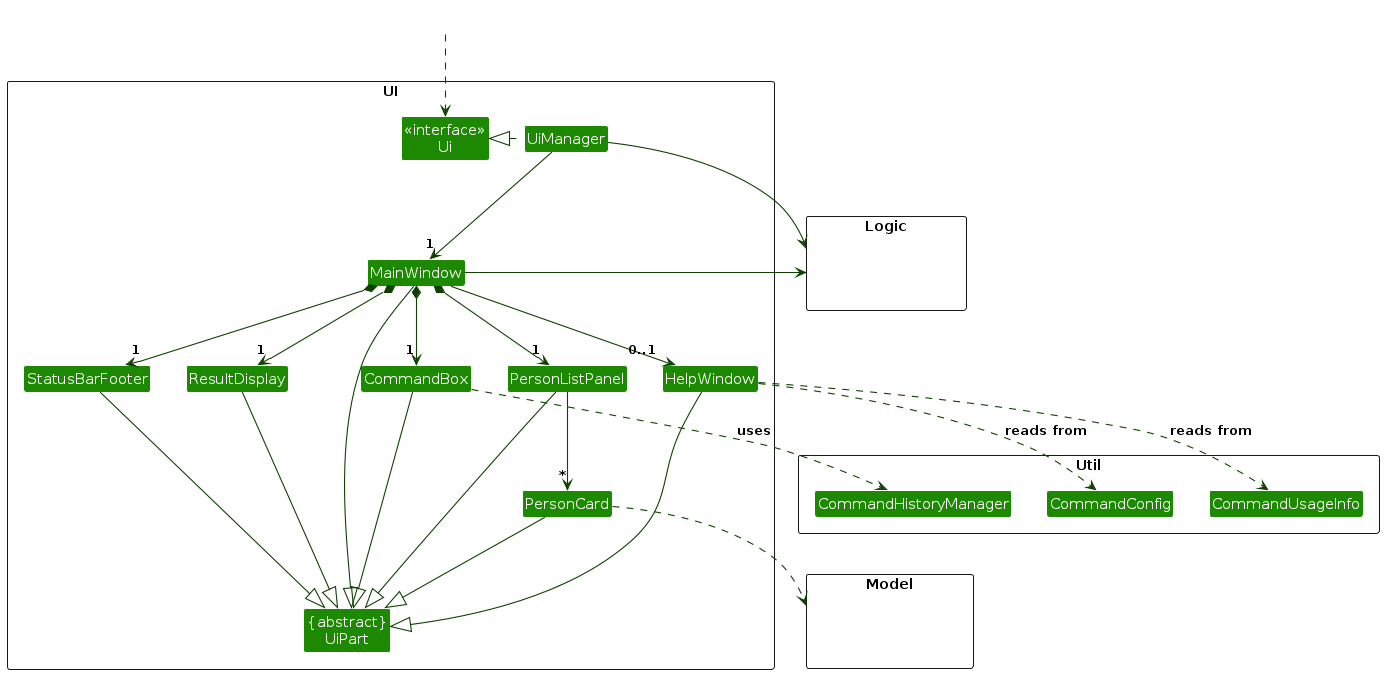
The UI consists of a MainWindow that is made up of parts e.g.CommandBox, ResultDisplay, PersonListPanel, StatusBarFooter etc. All these, including the MainWindow, inherit from the abstract UiPart class which captures the commonalities between classes that represent parts of the visible GUI.
The UI component uses the JavaFx UI framework. The layout of these UI parts are defined in matching .fxml files that are in the src/main/resources/view folder. For example, the layout of the MainWindow is specified in MainWindow.fxml
The UI component,
- executes user commands using the
Logiccomponent. - listens for changes to
Modeldata so that the UI can be updated with the modified data. - keeps a reference to the
Logiccomponent, because theUIrelies on theLogicto execute commands. - depends on some classes in the
Modelcomponent, as it displaysPersonobject residing in theModel.
Logic component
API : Logic.java
Here's a (partial) class diagram of the Logic component:
The sequence diagram below illustrates the interactions within the Logic component, taking execute("delete 1") API call as an example.
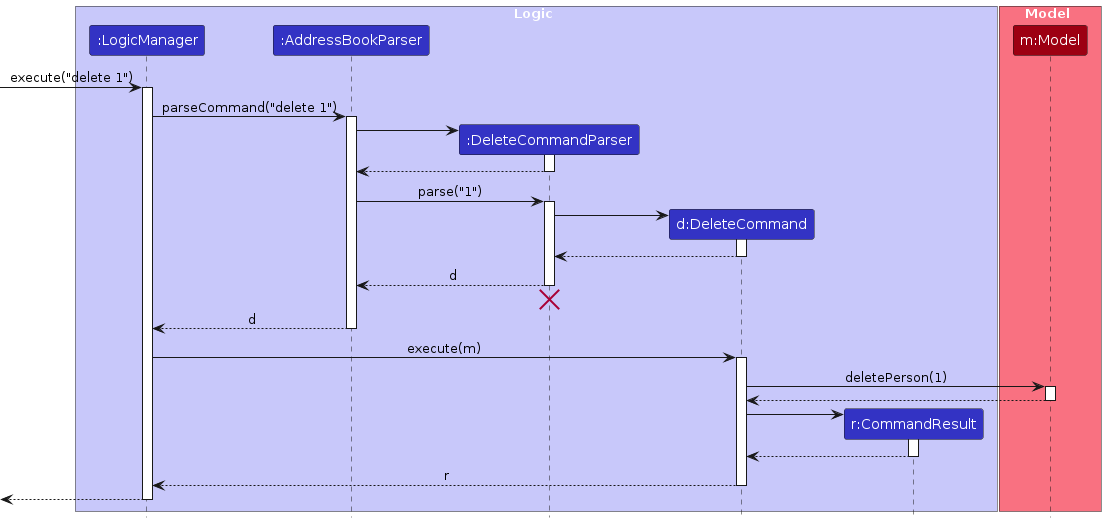
Note: The lifeline for DeleteCommandParser should end at the destroy marker (X) but due to a limitation of PlantUML, the lifeline continues till the end of diagram.
How the Logic component works:
- When
Logicis called upon to execute a command, it is passed to anAddressBookParserobject which in turn creates a parser that matches the command (e.g.,DeleteCommandParser) and uses it to parse the command. - This results in a
Commandobject (more precisely, an object of one of its subclasses e.g.,DeleteCommand) which is executed by theLogicManager. - The command can communicate with the
Modelwhen it is executed (e.g. to delete a person).
Note that although this is shown as a single step in the diagram above (for simplicity), in the code it can take several interactions (between the command object and theModel) to achieve. - The result of the command execution is encapsulated as a
CommandResultobject which is returned back fromLogic.
Here are the other classes in Logic (omitted from the class diagram above) that are used for parsing a user command:
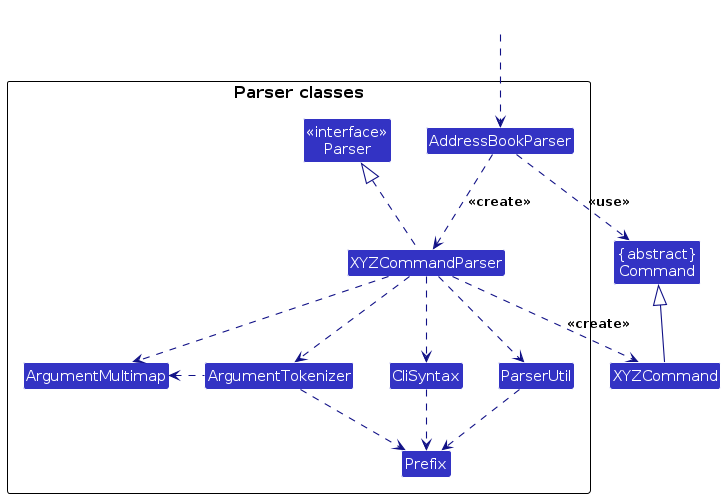
How the parsing works:
- When called upon to parse a user command, the
AddressBookParserclass creates anXYZCommandParser(XYZis a placeholder for the specific command name e.g.,AddCommandParser) which uses the other classes shown above to parse the user command and create aXYZCommandobject (e.g.,AddCommand) which theAddressBookParserreturns back as aCommandobject. - All
XYZCommandParserclasses (e.g.,AddCommandParser,DeleteCommandParser, ...) inherit from theParserinterface so that they can be treated similarly where possible e.g, during testing.
Model component
API : Model.java
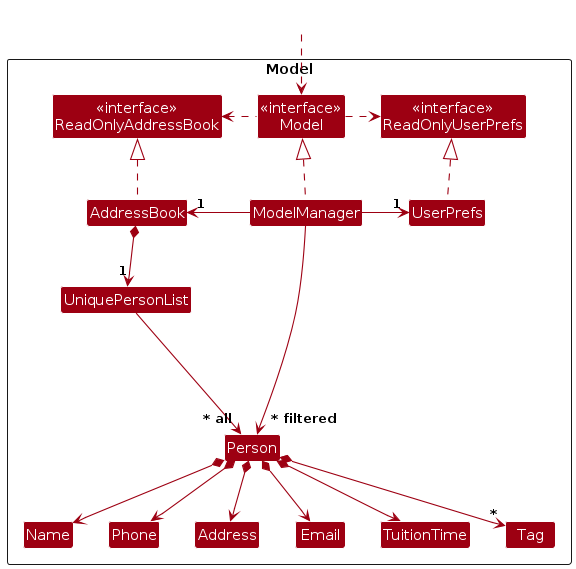
The Model component,
- stores the address book data i.e., all
Personobjects (which are contained in aUniquePersonListobject). - stores the currently 'selected'
Personobjects (e.g., results of a search query) as a separate filtered list which is exposed to outsiders as an unmodifiableObservableList<Person>that can be 'observed' e.g. the UI can be bound to this list so that the UI automatically updates when the data in the list change. - stores a
UserPrefobject that represents the user’s preferences. This is exposed to the outside as aReadOnlyUserPrefobjects. - does not depend on any of the other three components (as the
Modelrepresents data entities of the domain, they should make sense on their own without depending on other components)
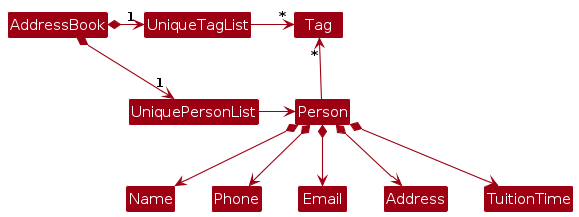
Note: An alternative (arguably, a more OOP) model is given below. It has a Tag list in the AddressBook, which Person references. This allows AddressBook to only require one Tag object per unique tag, instead of each Person needing their own Tag objects.
Storage component
API : Storage.java
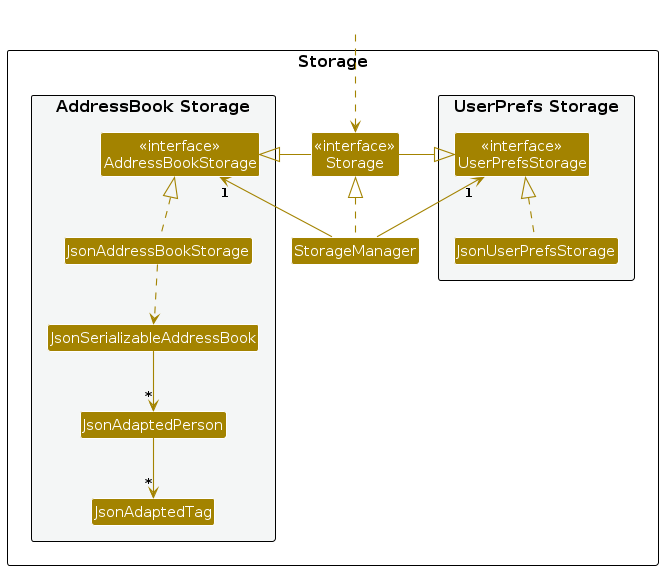
The Storage component,
- can save both address book data and user preference data in JSON format, and read them back into corresponding objects.
- inherits from both
AddressBookStorageandUserPrefStorage, which means it can be treated as either one (if only the functionality of only one is needed). - depends on some classes in the
Modelcomponent (because theStoragecomponent's job is to save/retrieve objects that belong to theModel)
Common classes
Classes used by multiple components are in the seedu.address.commons package.
Implementation
This section describes some noteworthy details on how certain features are implemented.
List Command
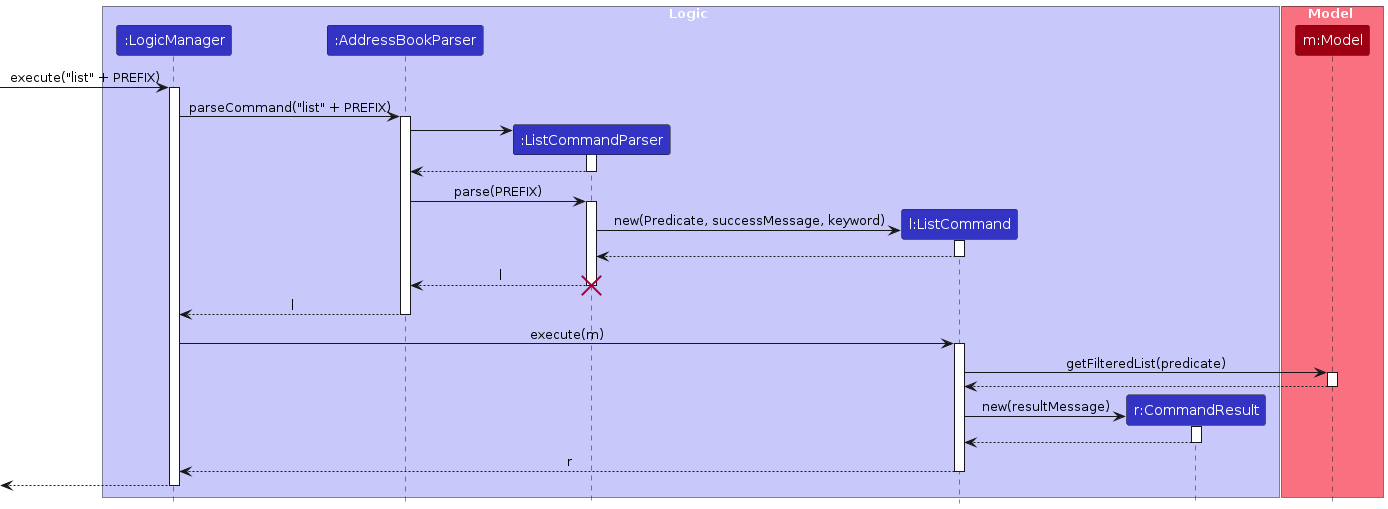
The sequence diagram below illustrates how the list command is processed when the user enters a command such as list, list t/Math, list tt/Monday, list tt/mon .
This command allows users to either
- list all student via
list - list all students with a specific subject specified after
t/.- example:
list t/math,list t/Science.
- example:
- list all students with a tuition time on a specific day specified after prefix
tt/.- example:
list tt/Monday,list tt/mon,list tt/Monday, 1000-1200
- example:
The process involves the following key objects:
LogicManager parses the user input into a ListCommand.
ListCommand is executed via the Model.
The model updates its filtered list using the predicate provided by ListCommand.
The UI is automatically refreshed based on the updated filtered list.
Sort Command
The sort feature allows tutors to organize the student list based on specific fields such as name, address, email, phone, subject, or tuition timing. This improves usability by enabling tutors to view student data in a desired order, which is especially useful when managing many students.
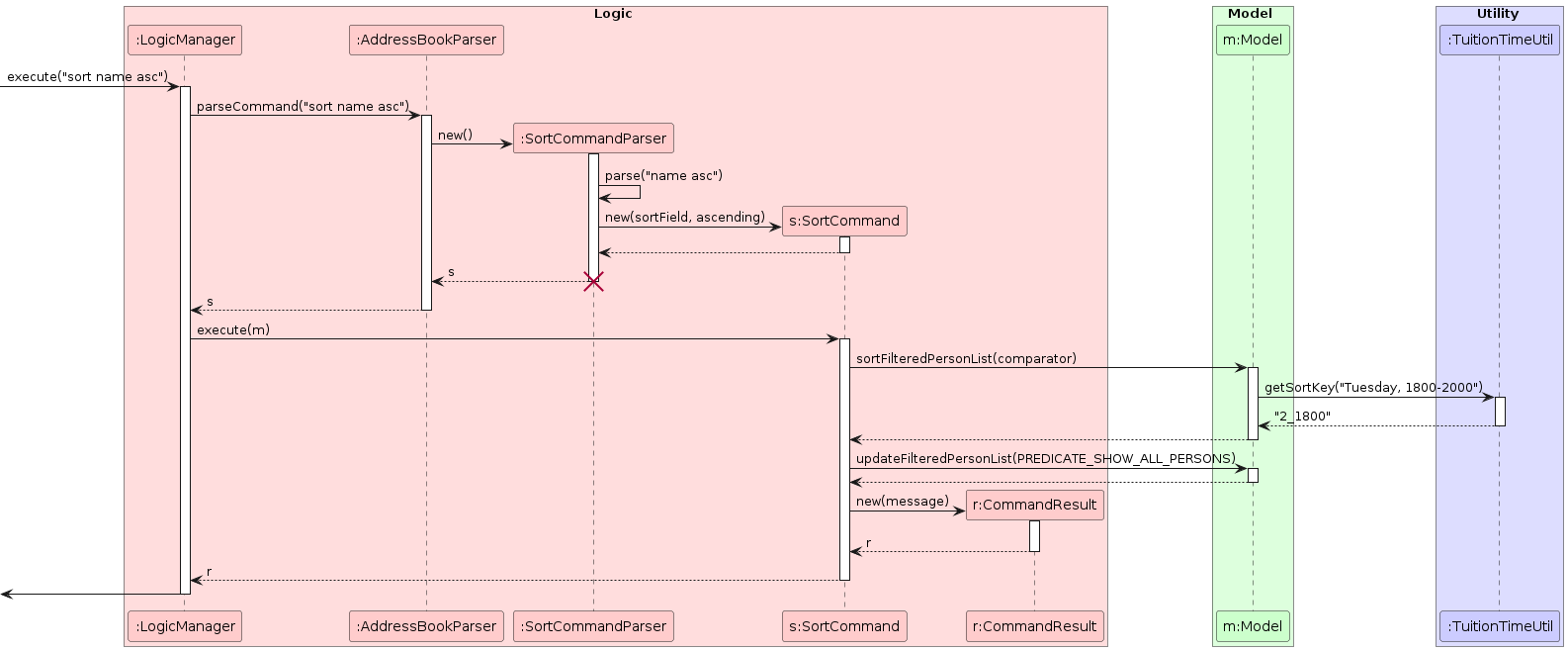
The sort command is implemented using the SortCommand class, which accepts a field keyword (e.g., name, phone) and applies the corresponding comparator to the address book list. The command then updates the filtered person list with the sorted result.
The sorting logic is encapsulated in the PersonComparators utility class, which contains static comparators for each sortable field. This separation of concerns makes it easier to maintain and extend.
When the sort command is executed:
- The user input is parsed into a
SortCommandwith a specific comparator. - The model’s
sortPersonListmethod is called with this comparator. - The list displayed to the user is updated to reflect the new sorted order.
If an invalid or unsupported field is provided, the command will return an error message explaining valid options.
Documentation, logging, testing, configuration, dev-ops
Appendix: Requirements
Product scope
Target user profile:
- private tutors who need to manage a significant number of contacts and lesson details
- private tutors who conduct weekly lessons to each student in the day
- prefer desktop apps over other types
- can type fast
- prefers typing to mouse interactions
- is reasonably comfortable using CLI apps
- the context is Singapore where the form of communication is mainly in English
Value proposition:
- TutorProMax is an all-in-one desktop assistant built specifically for tutors. Whether they are juggling multiple students, managing lesson time, or students' subjects, TutorProMax keeps everything organised in one place. With intuitive features like scheduling, reminders, and offline support, it empowers tutors to focus more on teaching and less on administrative work. Say goodbye to cluttered spreadsheets and scattered notes — TutorProMax helps tutors run their tutoring business like pros.
- It is especially suited for tutors who can type fast and prefer a Command Line Interface (CLI) over graphical interfaces, allowing for faster, more efficient workflows.
User stories
Priorities: High (must have) - * * *, Medium (nice to have) - * *, Low (unlikely to have) - *
| Priority | As a … | I want to … | So that I can… |
|---|---|---|---|
* * * | new user | see usage instructions | refer to instructions when I forget how to use the App |
* * * | user | add a student | keep track of all students and can refer to their contact details when I need |
* * * | user | delete a student | remove outdated or irrelevant student contact details |
* * * | user | view all students' contact details | easily access students’ information and retrieve their contact details efficiently |
* * * | user | find a student by his/her name | locate details of students without having to go through the entire list |
* * | user | edit a contact details | update new information without having to go through the process of delete and add |
* * | user | list lessons by date | view all lessons scheduled on a particular day |
* * | user | list students by subject | view all students with a filtered subject |
* * | user | sort students according to a field I specified | view all student a in particular order for to find them more easily |
* * | user | Press ↑ and ↓ keys after entering commands | navigate the previous commands more easily especially if i want to add, delete, edit multiple students |
Use cases
(For all use cases below, the System is the AddressBook (TutorProMax) and the Actor is the user (tutor), unless specified otherwise)
Use case: Add a student
MSS
User requests to add a specific person in the list
TutorProMax adds the student
Use case ends.
Extensions
1a. The student already exists in the list
1a1. TutorProMax shows an error message
- Use case resumes at step 2
Use case: Delete a person
MSS
User requests to list persons
TutorProMax shows a list of persons
User requests to delete a specific person in the list
TutorProMax deletes the person
Use case ends.
Extensions
2a. The list is empty.
Use case ends.
3a. The given index is invalid.
3a1. TutorProMax shows an error message.
Use case resumes at step 2.
Use case: Find a student by his/her name
MSS
User requests to search for a student by name
TutorProMax searches for the student in the list
TutorProMax displays the matching student(s)
Use case ends.
Extensions
2a. No matching student found
2a1. TutorProMax displays a message indicating that no student matches the given name
Use case ends
Use case: List persons
MSS
User requests to list persons
TutorProMax lists all students in the address book.
Use case ends.
Extensions
- 1a. User specifies a tag keyword (e.g.
list t/math).- 1a1. TutorProMax lists students whose tags contain the specified keyword. Use case ends.
- 1b. User specifies a tuition day keyword (e.g.
list tt/monday).- 1b1. TutorProMax lists students whose tuition time contains the specified day.
Use case ends.
- 1b1. TutorProMax lists students whose tuition time contains the specified day.
- 1c. User specifies both tag and tuition time (e.g.
list tt/monday t/math).- 1c1. TutorProMax lists students who match both the tuition day and tag. Use case ends.
- 1d. No students match the given filter(s)
- 1d1. TutorProMax shows a message indicating no matching students found.
Use case ends.
- 1d1. TutorProMax shows a message indicating no matching students found.
- 1e. User inputs an invalid format (e.g.
list tt/mondae)- 1e1. TutorProMax shows an error message indicating invalid input.
Use case ends.
- 1e1. TutorProMax shows an error message indicating invalid input.
Use Case: Sort students
MSS
User requests to sort students by a specified field and order.
TutorProMax sorts and displays the student list accordingly.
Use case ends.
Extensions
1a. User specifies a valid field and order (e.g.
sort name asc)- 1a1. TutorProMax sorts the address book using the given field and order.
Use case ends.
- 1a1. TutorProMax sorts the address book using the given field and order.
1b. User specifies an invalid field (e.g.
sort grade asc)- 1b1. TutorProMax shows an error message:
Invalid sort field. Valid fields: name, phone, email, address, tuition, tag
Use case ends.
- 1b1. TutorProMax shows an error message:
1c. User omits sort order (e.g.
sort name)- 1c1. TutorProMax shows an error message indicating invalid command format.
Use case ends.
- 1c1. TutorProMax shows an error message indicating invalid command format.
1d. User inputs an invalid sort order (e.g.
sort name upwards)- 1d1. TutorProMax shows an error message indicating sort order must be
ascordesc.
Use case ends.
- 1d1. TutorProMax shows an error message indicating sort order must be
Use Case: Edit a student
MSS
User requests to edit a specific student by specifying their index in the list.
TutorProMax updates the student’s details with the provided fields.
Use case ends.
Extensions
1a. The specified index is invalid (e.g. index does not exist in the current list)
- 1a1. TutorProMax shows an error message indicating the index is invalid.
Use case ends.
- 1a1. TutorProMax shows an error message indicating the index is invalid.
1b. No fields are specified for editing (e.g.
edit 2)- 1b1. TutorProMax shows an error message indicating that at least one field must be provided.
Use case ends.
- 1b1. TutorProMax shows an error message indicating that at least one field must be provided.
1c. User clears all tags by specifying
t/without any tags- 1c1. TutorProMax removes all tags from the student.
Use case ends.
- 1c1. TutorProMax removes all tags from the student.
1d. User specifies invalid values (e.g. email without '@', invalid phone number, etc.)
- 1d1. TutorProMax shows an appropriate validation error message.
Use case ends.
- 1d1. TutorProMax shows an appropriate validation error message.
Non-Functional Requirements
- Should work on any mainstream OS as long as it has Java
17or above installed. - Should be able to hold up to 1000 persons without a noticeable sluggishness in performance for typical usage.
- A user with above average typing speed for regular English text (i.e. not code, not system admin commands) should be able to accomplish most of the tasks faster using commands than using the mouse.
- The system should not require additional dependencies beyond standard Java libraries for core functionalities.
Glossary
- Mainstream OS: Windows, Linux, Unix, MacOS
- Tutor: Private tutor who conducts weekly one to one, face-to-face lessons with his/her students.
- Tag: Tags are used to classify students according to subjects.
Appendix: Instructions for Manual Testing
Below are the manual test cases for verifying each feature of TutorProMax.
Note: These are starting points. Testers are encouraged to perform exploratory testing for more thorough coverage.
Launch and Shutdown
1. Initial Launch
- Download the
.jarfile and copy it into an empty folder. - Open a terminal and
cdinto the folder. - Run:
java -jar tutorpromax.jar - Expected: GUI opens with sample data.
2. Saving Window Preferences
- Resize and move the window. Close the app.
- Re-launch it using the same command.
- Expected: Previous window size and position is retained.
Adding a Person
Command: add n/John Doe p/98765432 e/john@example.com a/123 Clementi Rd tt/Monday, 1000-1200 t/Math t/Science
- Expected: John Doe is added to the list with all the details correctly saved and displayed.
Invalid Cases to Test:
- Missing mandatory fields:
add p/98765432- Error Message:
Invalid command format! add: Adds a person to the address book. Parameters: n/NAME p/PHONE e/EMAIL a/ADDRESS tt/TUITION_TIME [t/TAG]... Example: add n/John Doe p/98765432 e/johnd@example.com a/311, Clementi Ave 2, #02-25 tt/Monday, 1400-1600 t/Math t/Science.
- Invalid phone number:
add n/Jane p/abc123→ Same error message as above.
Listing All Persons
Commands to Test:
listlist t/Mathlist tt/MondayExpected:
list: Shows all contacts.list t/Math: Filters only those with Math tag (case-sensitive).list tt/Monday: Filters only those with tuition on Monday.
Invalid Cases to Test:
- Invalid day format:
list tt/mondayyy- Error Message:
Invalid day entered. Please use a valid day like 'monday' or 'mon' (case-insensitive). list with no prefix behind list all contacts. list with prefix list all contacts with the keyword specified in rhe prefix. Parameters: [field, keyword] There are 2 fields available: t/[subject] or tt/[tuition time (day)]. Example: list t/Math Example: list tt/Monday
- Error Message:
- Empty field with prefix:
list t/- Error Message:
Please enter field and keyword! list with no prefix behind list all contacts. list with prefix list all contacts with the keyword specified in rhe prefix. Parameters: [field, keyword] There are 2 fields available: t/[subject] or tt/[tuition time (day)]. Example: list t/Math Example: list tt/Monday
- Error Message:
Finding Persons by Name
Command: find John
- Expected: All persons with "John" in their name (case-insensitive) are listed.
Additional Cases:
find John Alexfind jOhNfind(no input) → Should show error.Invalid command format! find: Finds all persons whose names contain any of the specified keywords (case-insensitive) and displays them as a list with index numbers. Parameters: KEYWORD [MORE_KEYWORDS]... Example: find alice bob charlie
Editing a Person
Command: edit 1 p/91234567 e/new@example.com
- Expected: Updates the phone and email of person at index 1.
Additional Cases:
edit 2 n/Alice t/→ Clears tags.edit 5(no fields) → Error message.edit 0or index out of bounds → Error message.
Deleting a Person
Command: delete 2
- Expected: The 2nd person in the current list is removed.
Additional Cases:
delete→ Error.delete abc→ Error.delete 100→ Error if out of bounds.
Sorting
Commands to Test:
sort name ascsort tuition descsort by email ascExpected: List is sorted as specified.
Invalid Case:
sort by banana desc→ Error: Invalid sort field.
Clearing All Entries
Command: clear
- Expected: All contacts are removed.
Edge Case:
clear 123→ Should still work and clear everything.
Exiting the Program
Command: exit
- Expected: Application closes.
Help Command
Command: help
- Expected: Help window opens with list of commands.
Command History
- Press
↑and↓keys after entering commands. - Expected: Cycles through previously entered commands.
Saving and Editing Data
1. Data Persistence
- Add/edit/delete a person.
- Close and reopen the app.
- Expected: All data changes are saved.
2. Editing the JSON File
- Navigate to
[home]/data/addressbook.json - Manually modify a valid entry.
- Restart the app.
- Expected: Updated values are reflected.